
Rashtriya e-Pustakalaya is a free Government of India digital reading initiative for children and young people. Its official website organizes books and reading material for different age groups and aims to make stories and learning resources available beyond the school textbook. A parent with a basic smartphone or a teacher with one shared screen can begin by choosing a suitable book and setting a realistic reading routine, without buying an expensive course subscription.
The official About page identifies the Department of School Education and Literacy, Ministry of Education, as the initiative’s home, and describes device-agnostic access to digital books across languages and reading levels. The programme launched in February 2024 and remains useful in November 2026 because the need for enjoyable, accessible reading does not depend on a daily breaking-news cycle.
On this page: What the service is · Access and registration · Age-based reading · Choosing books · 20-minute habit · Classroom use · Privacy and limitations · FAQs
What is Rashtriya e-Pustakalaya?
The government describes the service as a national digital reading ecosystem designed to provide curated books and related learning material beyond standard classroom curricula. It is associated with the National Book Trust and the Department of School Education and Literacy. Its emphasis is wider reading: stories, knowledge, language exposure and different genres that can encourage children to read voluntarily. It should not be confused with the National Digital Library of India’s broader research resources, a school exam board portal or a private paid e-book shop.
The service promotes free access, but that does not mean every book on the internet is free to copy, print, download or redistribute. Use the platform’s current access and copyright terms for each item. An educational website should link to the authorised reader rather than republish entire digital books as images or PDFs.
How to access the official free library
- Start at the official Rashtriya e-Pustakalaya website, checking that the domain is under education.gov.in.
- Browse books through the age-group or recommended-book sections.
- Open a title’s details to see whether it suits the child’s language, reading level and interests.
- If the platform requires account registration or a one-time password for a particular function, use only the official site’s instructions.
- Read within the permitted app or website and avoid sharing a child’s personal information publicly.
We have not claimed to complete registration or test every device. Availability of a specific title, format, audio feature or download option may change. If a book does not open, check whether the current site is asking for login or a supported reader and consult the official contact/help page rather than installing an unknown app or browser extension advertised in a comment thread.
Which age group should families choose?
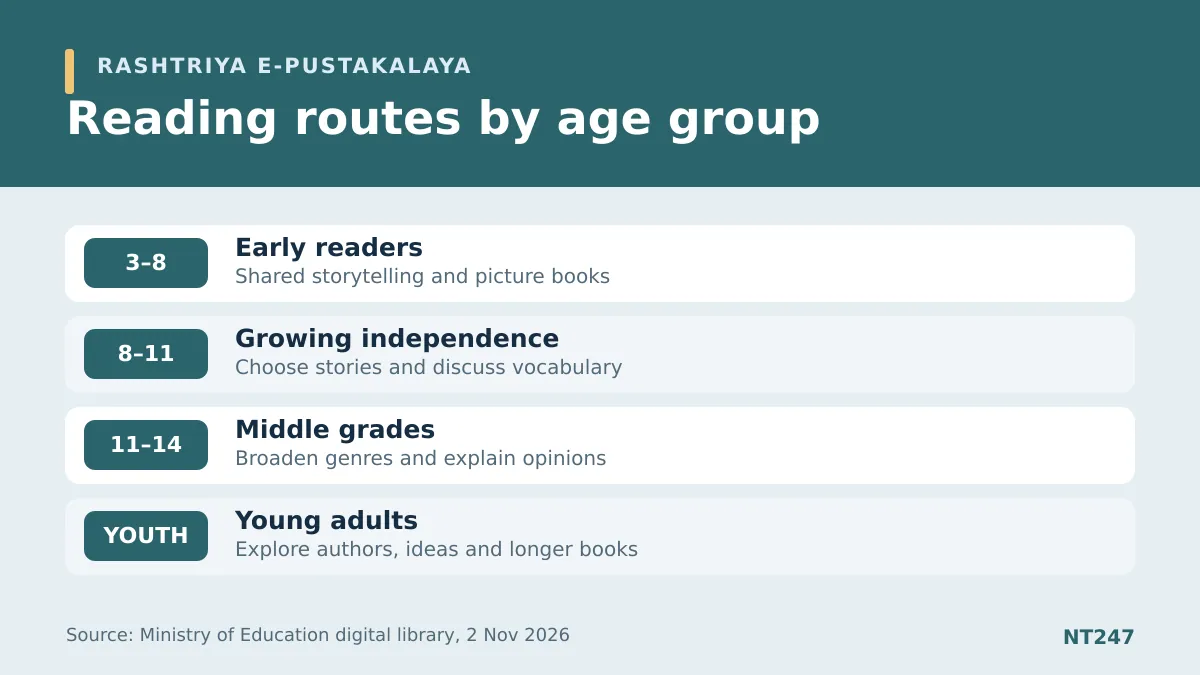
The official age-group browsing page shows four broad stages: ages 3–8, 8–11, 11–14 and young adults. These are useful filters, not hard limits on ability. A child in Class 6 may enjoy books from the 11–14 section, while someone rebuilding reading confidence might choose a shorter book from a younger section. Comprehension, interest and confidence matter more than an age label alone.
| Portal age group | Useful family approach | What to avoid |
|---|---|---|
| 3–8 years | Read aloud, discuss pictures, repeat favourite stories | Forcing silent speed-reading |
| 8–11 years | Offer choices, ask what happened and why | Treating every new word as a test |
| 11–14 years | Discuss plot, evidence, unfamiliar vocabulary and perspective | Only giving exam passages |
| Young adults | Explore longer fiction, non-fiction and ideas | Prescribing a single “best” genre |
How to choose the right book without overwhelming a child
Begin with a topic the child already cares about: animals, technology, travel, sports, a true story or a mystery. Read the opening pages together and ask whether the child can explain the main idea in their own words. If almost every sentence requires help, switch to a shorter or simpler title; if the book is effortless and uninteresting, try greater depth. There is no virtue in insisting that every child of one age must read the same difficulty.
Language choice also matters. Children may develop confidence reading in a familiar home language, then enjoy a bilingual or English book later. A parent need not be a fluent English speaker to ask thoughtful questions about a story’s meaning. For children with visual, hearing or reading-support needs, check the platform’s current accessibility tools and the school’s accommodations instead of assuming every digital title has audio or adjustable text.
A realistic 20-minute reading routine
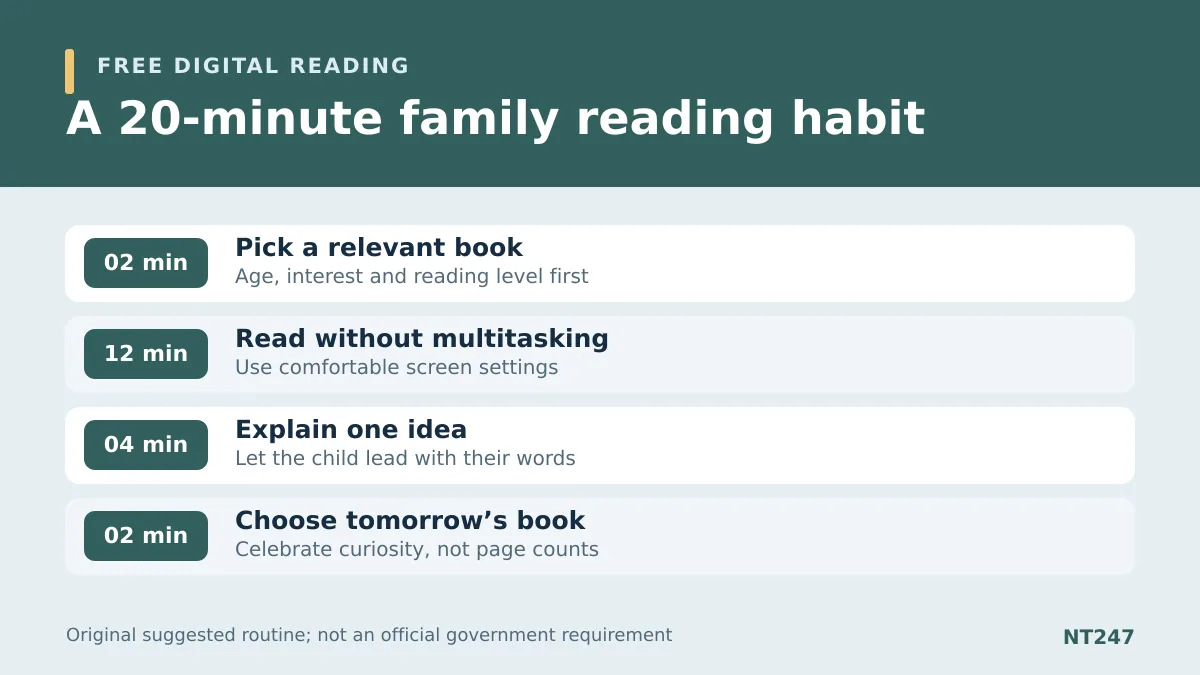
A routine is easier to keep when it is short enough for a busy school day. Try two minutes to let the child choose a book, twelve minutes of focused reading, four minutes to talk about one surprising idea and two minutes to decide what to read tomorrow. The exact length is a suggestion, not a medical or pedagogical requirement. A family can adapt it to a child who reads slowly, gets tired quickly or needs breaks.
Ask questions that invite thought: “What would you have done differently?” “What detail supports that?” “Which word helped you picture the setting?” Avoid turning each evening into a graded comprehension quiz. If the child dislikes the selection, choosing another legitimate book is often better than forcing completion. The goal is sustained curiosity and understanding, not a fake streak displayed on social media.
How teachers can use one shared digital screen
The library may help classrooms where printed collections are limited. A teacher can select an age-appropriate title before class, show a short excerpt legally through the official reader and ask students to compare characters, evidence or themes. In a class without individual devices, small-group discussion can still support reading. Teachers should use the platform’s usage permissions, school technology policies and any safeguards required for students.
A useful activity is an “evidence postcard”: after reading, each student writes the title, author as credited, one fact or idea from the text and a question for the next session. This records actual learning and source attribution instead of simply reporting the number of books clicked. Another is a class reading shelf where children recommend genres and explain why a book might suit a friend, without publishing classmates’ personal details online.
Privacy, screen time and content limits
Free access does not eliminate ordinary digital safety. Parents should confirm the official government domain, keep OTPs private and avoid children entering identity information on imitation websites. Screen brightness and breaks should be adjusted for comfort; a child who finds screens difficult can still use shared reading or printed books. The best reading format is one the learner can comfortably understand and return to.
The catalogue can change, so claims about a fixed total number of books or the guaranteed availability of a particular copyrighted title need a dated official count. We have deliberately omitted unsupported claims that every book is downloadable or that one app works perfectly on every device. The platform is one useful resource among school libraries, public libraries and family storytelling.
Frequently asked questions
Is Rashtriya e-Pustakalaya free?
The Ministry of Education describes it as a free digital reading initiative. Individual access and reproduction rights remain governed by the platform’s current terms.
Which website is official?
ndl.education.gov.in is the official government portal referenced here.
Does the portal have books for Class 6?
The official site includes an 11–14 age-group category relevant to many middle-school learners, but book choice should match the individual reader.
Can teachers copy all the books into classroom PDFs?
Do not assume that. Link to the authorised official reader and follow the listed copyright and permitted-use terms.
Official source notes and disclosure
Checked 2 November 2026 IST: government About page, age-group catalogue, platform terms and official contact. The suggested routine and classroom activities are original guidance, not government instructions.
Visual disclosure: The feature image is AI-created conceptual photography; its tablet does not show the actual government portal or licensed book covers. Both supporting diagrams are original educational graphics.