
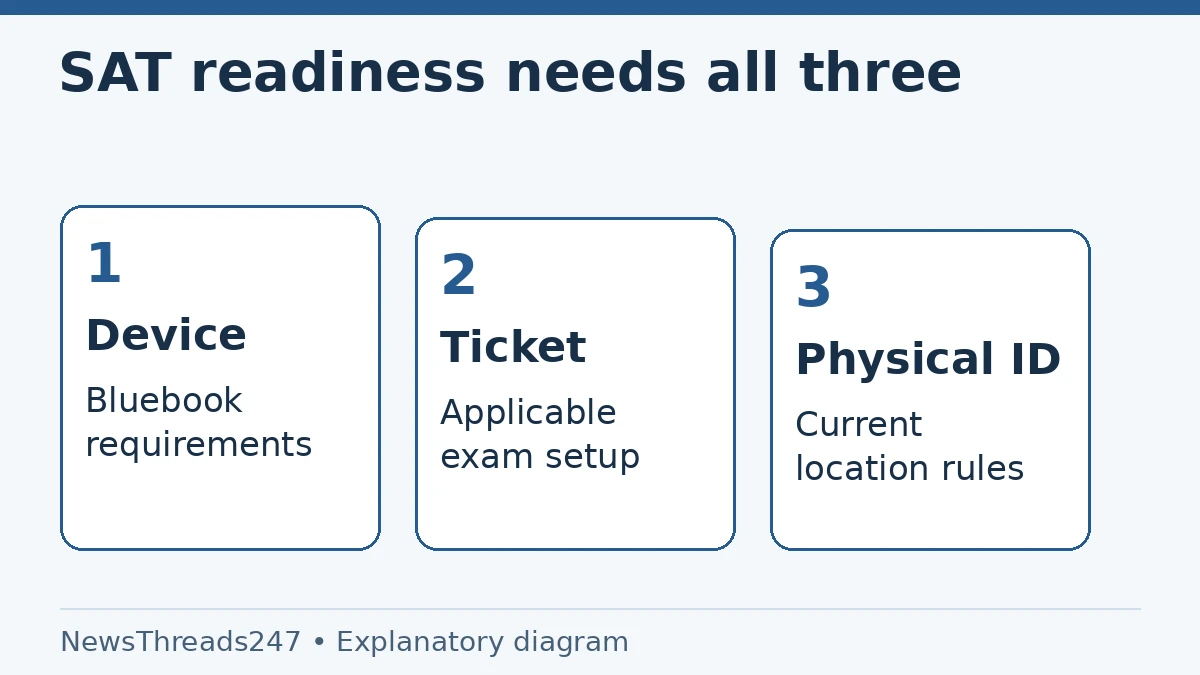
A charged laptop is on the desk, Bluebook is installed and the SAT registration email is saved. The student still has three checks to finish: whether that device meets the testing requirements, whether exam setup generated the admission ticket, and whether the physical ID meets the rules for the test location.
For SAT Weekend, these are connected tasks, not substitutes for one another. College Board’s current guidance places exam setup in the one-to-five-day window before the test. Students receiving a College Board loaned device follow a different ticket process at the centre. This guide covers those distinctions for readers in India and the United States, using rules checked October 26, 2026.
Start with the actual testing device
College Board’s device-readiness page lists supported device types and excludes phones, personal Chromebooks and Linux or PureOS devices. A school-managed Chromebook is a different category from a privately owned Chromebook. A familiar keyboard and a browser that opens the registration site do not establish Bluebook compatibility.
Use the device you intend to bring when preparing and practising. Check the current operating-system and hardware requirements through College Board’s linked checklist, rather than copying an old minimum version from a forum. A managed laptop may need school staff to install or configure the application.
Ask about restrictions early. If the device belongs to a school, confirm you can take it to the centre, sign in and complete the required setup. The test-day staff may not have the permissions needed to fix a managed device. Ownership and readiness are separate questions; neither should be left until the evening before the test.
Registration confirmation is not the admission ticket
The official what-to-bring page says to open Bluebook, sign in and complete exam setup one to five days before test day. This generates the up-to-date admission ticket. Keep that ticket available in the form College Board permits; the page says it can be printed or emailed to yourself.
Check the information on the new ticket. Do not assume the saved registration email, a receipt or an old screenshot is the same document. If you changed a centre or registration detail, compare the current account and ticket rather than relying on an earlier message.
Save the ticket where you can reach it at check-in without depending on an unreliable connection or a forgotten password. Printing a copy can be a practical backup where appropriate. It does not remove the need for the actual testing device, or turn a copy of an unacceptable ID into an acceptable identity document.
The loaned-device route has an important exception
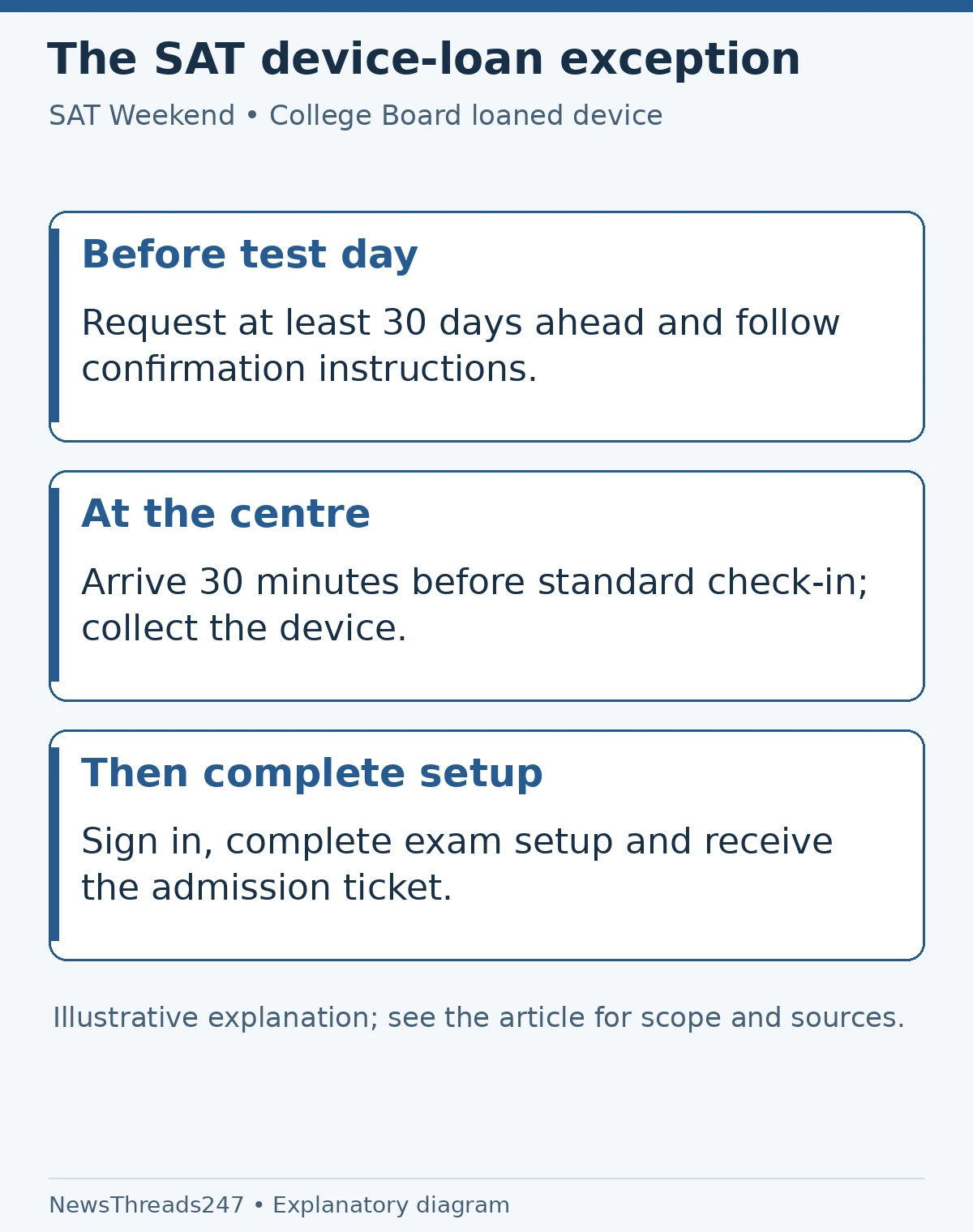
College Board’s device-lending instructions require a request at least 30 days before SAT Weekend. A request and an approved arrangement are different things: follow the confirmation and instructions supplied for your test rather than assuming the centre keeps spare devices for anyone who arrives without one.
Students receiving a College Board loaned device collect it at the centre, sign in and complete exam setup there. Their ticket is generated through that process on test day. The published instructions say to arrive 30 minutes before the standard check-in time for this arrangement. Read your own confirmation for the practical details.
If you missed the lending request window, do not treat this exception as a last-minute workaround. The page describes considering a later date or borrowing a suitable device from another available source. Verify compatibility and preparation for any substitute. A device’s availability does not establish its readiness.
Match the ID to the country and the person
The current SAT ID requirements must be checked alongside the ticket. Read the general conditions and the country-specific section; age and testing outside your home country can change which documents are acceptable. Bring the required original physical document, not an assumption based on what another exam accepted.
For testing in India, the page lists a valid passport and the permitted physical Aadhaar forms, with specific conditions. It explicitly excludes printouts, copies, screenshots and e-cards from the Aadhaar-letter route. Check the full current list and document requirements before choosing what to bring. A phone displaying an Aadhaar image is not equivalent to the accepted physical form.
The rules for testing outside your home country require a valid passport, subject to the specific exception stated on the official page. Students aged 21 or older also face a government-issued-ID requirement; a student card does not satisfy that age rule. Avoid applying an India-specific option to a test appointment in another country.
Three separate readiness checks
| Check | Evidence to inspect | Common wrong substitute |
|---|---|---|
| Testing device | Current Bluebook requirements and successful preparation | A laptop that can browse the web |
| Admission ticket | Current ticket after the applicable exam-setup process | Registration receipt or an old email |
| Identity | Accepted original physical ID with matching details | A screenshot or a document accepted by another exam |
In a fictional example, a student has completed setup and printed a ticket but plans to bring an ID screenshot. The laptop and ticket checks can pass while the identity check fails. The useful fix is obtaining the required acceptable original document or contacting College Board promptly—not reinstalling Bluebook.
Resolve name mismatches before the centre does
Read the name and other required identity details on the ticket against the ID, character by character. A nickname, missing surname or mismatched record deserves attention before travel. Use College Board’s official support process for the specific registration issue; do not edit a ticket image or create a replacement identity document.
The SAT testing rules explain that an ID mismatch or unacceptable document can lead to refused admission and other consequences. A preparation guide cannot authorise an exception on behalf of the centre. Ask the institution that sets the rule and retain its actual response.
Avoid posting the full ticket or ID in a public group to ask whether it looks correct. Share only a redacted description of the problem in public, and submit private details through the official support route if requested. Getting help should not require exposing your identity documents to strangers.
The final check belongs on the device you will bring
College Board’s readiness guidance advises reopening Bluebook on test morning, checking messages and updated centre information, and charging the battery. Follow its complete current checklist for supplies and settings. Carry the appropriate charger and verify what accessories or accommodations are allowed for your particular arrangement.
Plan travel around the check-in instructions, not an estimated exam start found on social media. A centre change or a device-loan instruction can affect the morning’s sequence. Keep the centre details, current ticket and support confirmation in the same small set of records so the student is not searching through unrelated emails at the door.
For SAT School Day and other in-school arrangements, follow the school’s preparation instructions. This article’s Weekend sequence should not be copied onto a school-administered test without checking which process applies. The name of the exam is not enough to identify the entire check-in procedure.
Keep test-day readiness separate from score sending
Once the device, ticket and ID agree, use the remaining preparation time for the assessment rather than repeatedly changing settings that already work. If something changes—a different laptop, a corrected identity record or a new centre—recheck the affected step and the current official instructions.
After testing, score reporting becomes a different decision. Our Score Choice and superscoring guide explains what a college may require you to send. That admissions question does not determine whether the centre can admit you on test morning.
Sources and visual credits
Sources: College Board’s device-readiness, what-to-bring, device-lending, ID requirements and SAT testing-rules pages, linked above and checked October 26, 2026. This guide does not replace individual test or accommodation instructions. Featured image: AI-generated conceptual illustration, not an official ticket or ID. Readiness and process diagrams: NewsThreads247.