

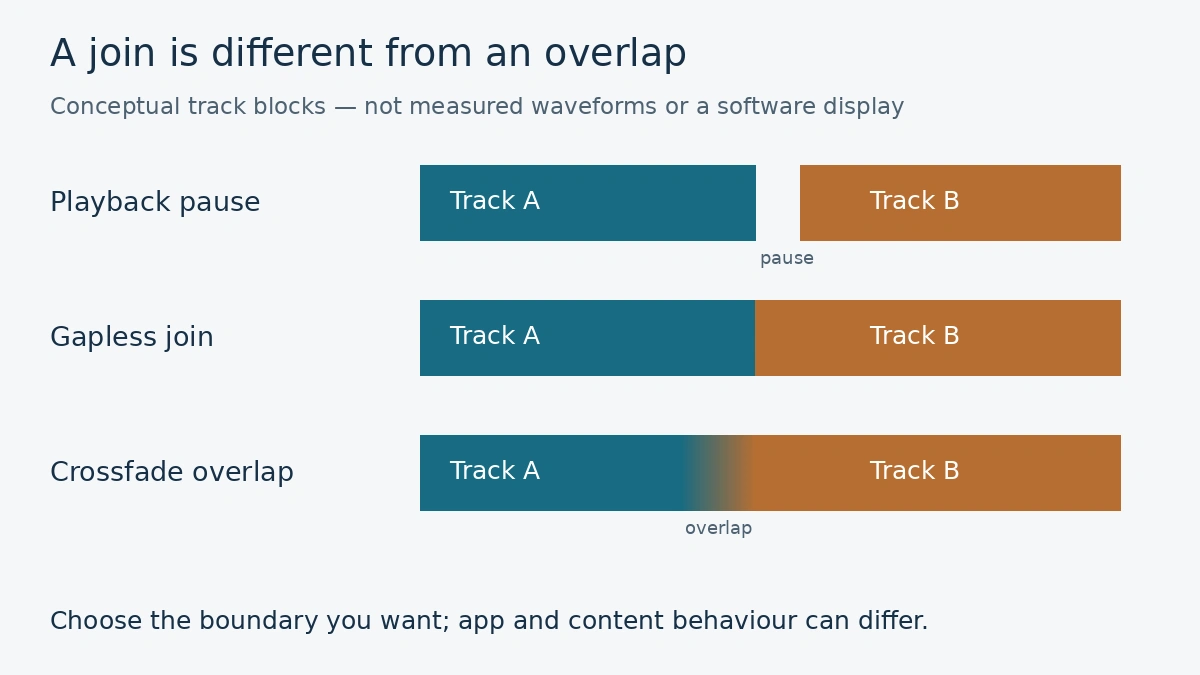
Gapless playback and crossfade can both make music feel more continuous, but they do different things. Gapless playback removes a playback gap between tracks. Crossfade lets the next song start while the previous one fades away. Choose between them according to what you want to hear at the boundary—not according to which label sounds more advanced.
For an album whose tracks connect, preserving that connection may matter most. For a mixed playlist, an overlap may be welcome. Automatic mixing adds another app-specific choice. This guide separates those listening goals, then uses current Spotify and Apple Music instructions as examples. Availability varies with the app, account, device, content and output route.
In this article
Decide what you want to happen between the songs
Imagine a fictional live album where applause carries from one track into the next. You want the next indexed track to begin without a new playback pause. You are not necessarily asking the player to place the next performance over the end of the applause. The distinction becomes easier to hear when you focus on the boundary rather than on an entire playlist.
Now imagine a playlist of separate songs for a gathering. You may prefer a gentle overlap so that one ending does not leave the room abruptly quiet. That is a different creative choice. It can also bring the next song in before a final lyric or instrumental ending has finished, so a longer transition is not automatically a better one.
Spotify’s transition guide distinguishes gapless playback, crossfade and Automix. It describes crossfade as overlapping a fading-out track with a fading-in track; gapless removes pauses between tracks. Automix uses beat-matched transitions on selected Spotify playlists, including when shuffled. These labels describe different behaviour, not a ladder of sound quality.
Before changing a setting, finish this sentence: “I want to remove an added pause,” or “I want the songs to overlap.” If neither is what you want, ordinary playback may suit the material. A spoken introduction, a quiet ending or an intentionally separate movement can be part of the listening experience.
Compare one pair of tracks in a controlled way
Choose two adjacent tracks you know and begin playback far enough ahead of the boundary to include the full transition interval. Keep their order fixed. Listen once with transition processing off, then make one change and replay the boundary. Do not judge the setting by repeatedly skipping straight to the next song; you would miss the ending you are trying to compare.
Listen for three things: whether an unwanted pause remains, whether the ending is shortened or obscured, and whether the beginning arrives clearly. Those observations help you choose a useful setting without pretending to measure the audio. Keep the listening level comfortable and unchanged during the comparison.
For crossfade, begin with a short available duration and increase it only if you prefer the result. There is no universal number of seconds for every genre, album or listener. A suitable overlap for two rhythmic tracks may interrupt a spoken passage or conceal an important musical ending.
If a pause remains even with the relevant option enabled, compare another pair and check the content version. A transition feature is not a promise to remove every silence that may be part of the recording itself. Also distinguish a gap at each track boundary from audio repeatedly stopping within a track; those are different symptoms.
Keep a favourite album and a mixed playlist as separate checks. You may want one transition choice for a playlist and a different presentation for sequential album listening. Review the app’s current behaviour rather than assuming that all content follows the same rule.
On Spotify, check the account and playback route
Spotify currently marks Crossfade and Automix as Premium features in its transition guide. Its mobile instructions place crossfade in Settings and privacy, then Playback, with a duration slider. The same guide places gapless and Automix controls in the track-transition area of Playback. Interfaces can vary, so follow the current help for the app you are using.
Spotify also warns that these features cannot be set while using Spotify Connect. Before treating an unavailable slider as a fault, check whether the phone is playing music itself or controlling another device. The screen showing the queue and the device actually producing the audio need not be the same thing.
Do not confuse a transition choice with loudness normalization. Spotify’s normalization guidance concerns balancing playback loudness between tracks. Changing that does not answer whether two track endings overlap. Adjust one kind of behaviour at a time.
Use the documented option rather than assuming that a playlist name guarantees Automix support. If your chosen pair does not behave as expected, note the app version, account type, playlist and output device before seeking help. That record is more useful than enabling every available sound option.
Apple Music’s automatic mixing has its own limits
Apple’s current transition instructions describe Crossfade as a fixed-duration fade and AutoMix as dynamic transitions for Apple Music subscription content. On supported iPhone and iPad software, Settings, Apps, Music, Song Transitions is the documented route for choosing the style. Turn Song Transitions off when you do not want that processing.
Apple lists specific limits: AutoMix is unavailable on Android, Windows and Intel-based Macs, among other exclusions, and neither AutoMix nor Crossfade is available with hi-res lossless. Do not turn that last condition into a claim that all lossless playback is excluded.
Apple also says AutoMix may not make a dynamic transition when an album is played sequentially, genres or tempos are incompatible, or content comes from uploaded or iTunes-purchased files. A missing dynamic mix in those circumstances is not by itself proof of a malfunction.
Check the current support page against your actual device and source material. Apple and Spotify use similar words for some features, but that does not establish identical processing or eligibility. Avoid copying a menu route from one service into the other.
Keep the choice that serves the music
After the comparison, keep the smallest change that gives you the boundary you prefer. If the overlap masks the end of a song, shorten or disable it. If a connected album now plays as you want, you do not need to keep altering other audio settings simply because they are available.
A playback transition does not create a newly released remix, cover or master. For the separate question of how a song reuses earlier music, see our guide to samples, interpolations and covers. The version you select and the way your player joins it to another track are different decisions.
Recheck the setting after a major app update or when you switch output devices. Record the track pair and original settings if you need support. This is a listening method you can repeat, not a hands-on comparison or a claim that one service sounds better.
Service guidance checked 18 November 2026; Apple’s linked article is dated 16 November 2026. Reverify account eligibility, supported devices, audio-quality limits and menu routes after updates. Original fictional examples and listening method by NewsThreads247 Editorial; no product testing or measured results are claimed.