
A fixed 80% charge limit and adaptive charging solve different problems. A fixed limit keeps the battery away from its highest state of charge on ordinary days; adaptive charging still aims for 100% but delays the final portion until closer to when you usually unplug. Choose the fixed limit when 80% comfortably covers your day, and use adaptive or a temporary full charge when you need more runtime.
Neither setting makes a battery immortal. Lithium-ion batteries are consumable, and ageing reflects temperature history, charging pattern, time and use. The useful decision is not whether 80 is a magic number. It is whether today’s missing 20 percentage points would create inconvenience greater than the possible long-term benefit of spending less time near full charge.
In this article
Fixed limit and adaptive charging are different
| Control | What it does | Best fit | Trade-off |
|---|---|---|---|
| Fixed charge limit | Stops near a selected ceiling such as 80%, 85%, 90% or 95% | Desk days, frequent top-ups, phones kept plugged in | Less unplugged runtime today |
| Adaptive/optimised charging | Learns a routine, pauses or slows, then completes near expected unplug time | Regular overnight charging when a full day is needed | May not trigger with an irregular schedule |
| Temporary 100% | Overrides the limit for a trip or long day | Travel, navigation, photography, weak-signal areas | More time at a high state of charge if left plugged in |
| Battery saver | Restricts background activity and performance | Extending remaining runtime after unplugging | Does not set the charging ceiling |
A common misunderstanding is that adaptive charging permanently caps the battery at 80%. It usually does not. Apple says Optimised Battery Charging can pause past 80% and finish before the learned unplug time. Google describes Pixel Adaptive Charging similarly. If you want a persistent ceiling, select the manufacturer’s separate limit setting when your model offers it.
Choose by the day you need
Start with a simple test: on a normal day, what percentage remains when you reach a reliable charger? If the phone routinely ends above 25–30%, an 80% or 85% limit may be practical. If it often reaches single digits, a fixed limit can turn battery preservation into daily anxiety. Use adaptive charging or a higher limit instead, then address heavy use, poor signal or an ageing battery separately.
- Use a lower fixed limit on predictable desk days or when the phone stays connected to power for hours.
- Temporarily allow 100% before travel, a long shift, outdoor navigation or a day of video capture.
- Use adaptive charging for a stable overnight routine when you still need a full morning charge.
- Raise the limit during weeks when your schedule changes; a setting should serve the user, not become a rule to obey.
- If the phone becomes hot while charging, reduce the heat source before debating 80% versus 100%.
Consider a commuter whose phone uses about 55% on a normal day. Starting at 80% leaves a reasonable reserve, so a fixed limit is easy. A field worker who regularly uses 85% should prioritise the full charge or a power bank. The same person may switch modes between office and travel days.
Quick decision guide: which charging mode fits your day?
Do you usually finish the day with plenty of battery? Try a fixed 80% or 85% limit for a week, provided your phone supports it and the remaining charge stays comfortable.
Do you regularly need almost a full battery? Prefer adaptive or optimised charging, or a higher ceiling. A temporary 100% charge is reasonable before a demanding day.
Is the phone unusually hot? Address heat and charging conditions first. A charge limit is not a substitute for safe temperature management.
This is a practical choice guide, not a battery-health prediction. Available settings depend on your device.
What current phones actually do
iPhone
Apple says iPhone 15 and later models can choose a charge limit from 80% to 100% in 5% steps. At 100%, Optimised Battery Charging can reduce the time spent fully charged. With a lower limit, the phone stops within a few percentage points of the target and resumes if charge falls sufficiently while connected. Apple also says the phone may occasionally charge to 100% to keep its state-of-charge estimate accurate.
Google Pixel
Google’s current Pixel guidance offers Adaptive Charging and Limit to 80% under Settings → Battery → Battery health → Charging optimisation on supported phones. Google says Adaptive Charging needs time to learn habits and may not activate when the routine changes. Its 80% guidance also notes that supported Pixels periodically complete a full charge for capacity readings.
Samsung Galaxy
Samsung India documents Battery protection modes on Galaxy models with One UI 6.1 or later. Maximum stops charging at 80%, while Adaptive uses different behaviour around sleep. Older software can use an 85% ceiling. Model and region support vary, so use the description displayed on the phone rather than assuming every Galaxy behaves identically.
Other manufacturers use names such as Smart Charging, Optimised Charging, Battery Care or Custom Limit. Those labels are not interchangeable. Read the on-screen explanation and the manufacturer’s current manual for the exact model and software version.
Heat matters more than charging rituals
High temperature is an immediate stressor for a lithium-ion battery. A phone can heat up because of fast charging, a thick insulating case, direct sun, a hot car, gaming, video recording, weak cellular signal or a damaged accessory. If the device is unusually hot, stop the heavy workload, move it to a cooler ventilated place and use a compatible charger. Do not cool it with a refrigerator, freezer, water or an ice pack.
Charging speed normally tapers near full. A compatible higher-watt charger does not force the phone to accept unlimited power; the phone negotiates and manages charging. Still, poor-quality or damaged cables and adapters can cause heat or unreliable charging. The site’s guide to USB-C cable labels explains why wattage, data and video capability are separate.
Why a limited phone may still reach 100%
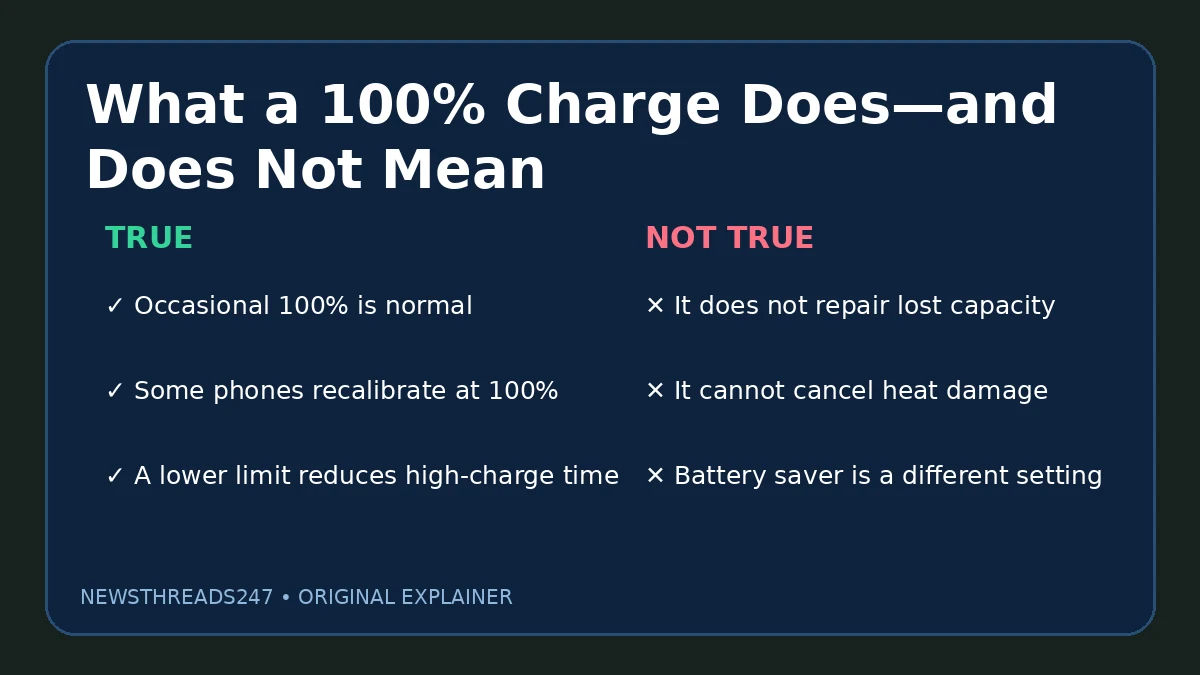
An occasional full charge does not necessarily mean the limit failed. Apple and Google both describe periodic 100% charging for measurement accuracy on supported devices. The battery-management system estimates state of charge; periodic full points can help maintain that estimate. Judge the setting over several cycles and compare the behaviour with the manufacturer’s current documentation.
Also distinguish a charge-limit override from a fault. A user may have selected “charge to full,” disabled the limit for travel, restarted into a different protection state or installed an update that changed the menu. If the phone repeatedly ignores the selected limit outside the documented calibration behaviour, update it, restart once, reselect the mode and then use official support.
A practical charging routine
- Enable the manufacturer’s charging optimisation rather than using an untrusted app that claims to control hardware charging.
- Pick a ceiling that leaves a realistic emergency reserve; 80% is an option, not a universal requirement.
- Use a temporary full charge on demanding days without treating it as a failure.
- Keep the phone out of direct sun and avoid heavy sustained workloads while it is hot and charging.
- Replace damaged cables and use compatible, certified power equipment.
- Review battery health or service status if runtime has fallen sharply; charging settings cannot restore lost chemical capacity.
If you fly with a power bank, charging strategy is only part of the decision. Airline and safety rules apply to the battery pack itself; see the site’s power-bank flight checklist before travel.
Common questions
Will charging to 100% once damage the battery?
A single full charge is normal use. The long-term concern is repeated time at high state of charge, especially with heat. Use 100% when the extra runtime is useful.
Is 80% always the best limit?
No. It is a practical preset on many phones, but the right ceiling depends on daily energy use and the available options. A higher limit can be the better compromise.
Why did the phone stay at 80% overnight?
A fixed limit may be enabled, or adaptive charging may be waiting to finish near the learned unplug time. Open the battery or charging screen and read the active mode and completion message.
Can a charging app create a hardware limit on any phone?
Do not assume so. On most phones, real charge control comes from the operating system and device firmware. Prefer built-in manufacturer controls.
Should I drain the battery to zero?
Routine deep discharge is unnecessary. Charge when convenient. If the manufacturer asks for a full cycle for diagnosis or calibration, follow that specific instruction.
Sources and maintenance note
Primary references checked 9 November 2026: Apple: Charge Limit and Optimised Battery Charging; Apple: Optimise iPhone battery charging; Google Pixel: get the most life from the battery; Google Pixel: maximise charging; and Samsung India: Battery protection in One UI. Recheck this guide when iOS, Android, Pixel or One UI changes charging menus, model eligibility or calibration behaviour.
This is general device-care information. Charging features vary by model, software, region and battery condition.