

If your ITI qualification was issued by India’s Directorate General of Training (DGT), start with the QR code printed on the official electronic certificate. The DGT’s 7 October 2026 verification notice says the old NCVT-MIS portal was decommissioned after its data moved to Skill India Digital Hub. A failed old bookmark is therefore a reason to change verification routes, and tells you little about the certificate itself.
In this article
Start with the issuer on the certificate
Read the qualification name and the issuing authority before you open a portal. “ITI” names the type of institute; it does not, by itself, identify who issued the document. A DGT National Trade Certificate (NTC), an apprenticeship National Apprenticeship Certificate (NAC), and a state-issued credential can all show up in a technical job search. Look at the issuer printed on the record rather than assuming one federal screen covers every document. For a state-issued credential, use that authority’s instructions or ask the issuing institute to identify the appropriate state channel.
Next compare the employer’s exact qualification wording with your record. If a posting asks for a particular trade, copy the wording from your certificate rather than substituting your preferred job title. A certificate can verify successfully while an employer still needs to decide whether a related trade meets the advertisement. Ask about that distinction before a deadline if the vacancy leaves room for doubt.
Use the official QR code and compare the returned record
Open the original e-certificate, preferably the official PDF rather than a compressed screenshot from a message thread. Scan its QR code with a trusted scanner or phone camera. The DGT says the code can lead to its Skill India Digital Hub portal or the Apprenticeship India portal, depending on the document. Check the destination before entering information; open the authority’s site directly if the address is unfamiliar. The government’s Bharat Skills verification directory separately lists CTS National Trade Certificate and apprenticeship certificate links, with a certificate and a marksheet option for each.
Treat what opens as a comparison. Check the name, qualification or trade, and any identifier, institute or session details the official record displays against the original document. The exact fields can vary. Keep the original available if HR asks to see a mark sheet separately. An e-certificate confirms the credential details the issuer makes available; it does not necessarily supply every mark or answer an employer’s eligibility question.
A useful test is to write down the one thing you are trying to prove. “This National Trade Certificate belongs to me” calls for issuer verification. “My result meets the advert’s minimum marks” may call for the official marksheet. “My trade qualifies for this opening” may require a written clarification from the recruiter. Keeping these questions separate stops a portal problem from turning into an argument about eligibility.
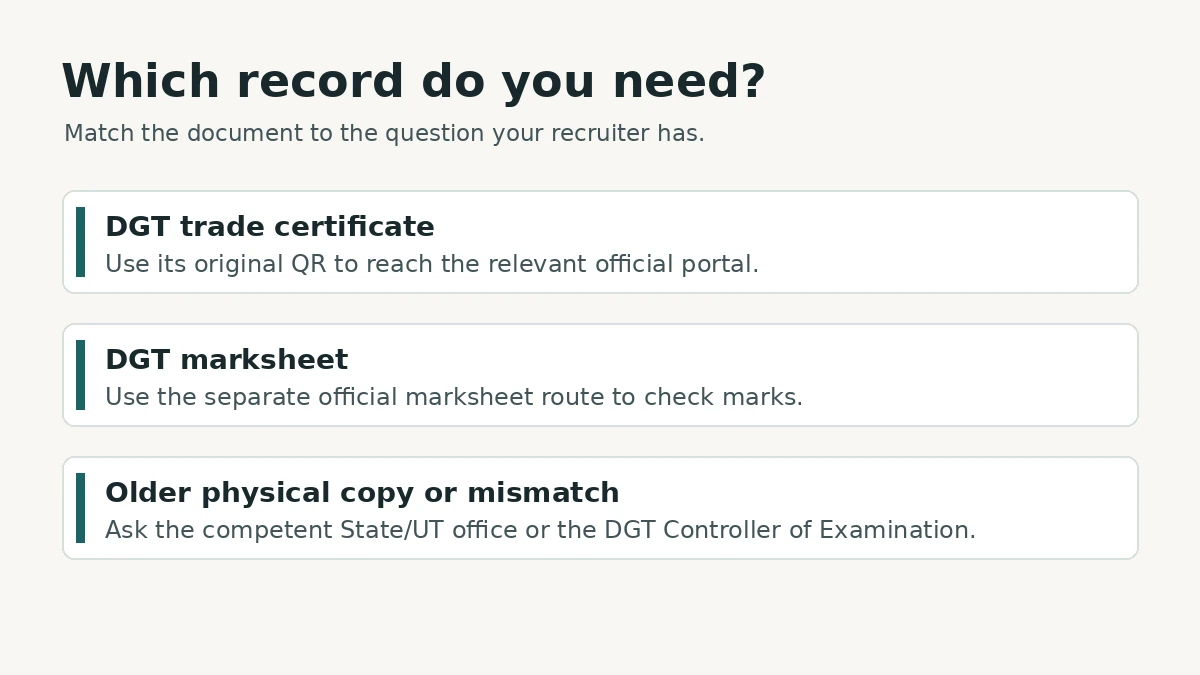
When the code fails, the name differs or the certificate is older
If the code is unreadable, first try the original file on a larger screen or a clean copy issued by the institute. If it opens a government page but no useful record appears, use the relevant certificate or marksheet route from the official directory instead of repeatedly searching the web for the old NCVT-MIS page. A blank search result is a reason to investigate the route and details, not enough evidence to call a record invalid.
If the official record has a different name, trade or other consequential detail, keep copies of the original and the discrepancy. Contact the issuing institute for help locating the right authority, then follow the DGT notice: for unverifiable records, discrepancies and physical certificates issued before 2014, the stated routes are the relevant state or union territory office responsible for vocational education and training and/or the DGT Controller of Examination. Some legacy certificates may have an electronic version; the physical record and an electronic copy should still be compared when both are available.
Keep the employer informed with a short, specific message. For example: “My DGT certificate is available, but the verification page shows a different spelling of my name. I’m checking the record with the issuing authority. May I submit the original and update you when I receive a response?” That is an example of wording, not a promise of an extension. If an application has a hard submission deadline, ask how to proceed and follow the published requirements. Do not edit the certificate to make it match.
Give the recruiter enough to verify the document
Suppose a fitter applicant has the right qualification, but an employer clicks an old NCVT-MIS bookmark. The applicant can send the original through the employer’s verified upload channel, point to the official verification notice, and clarify whether the recruiter needs the certificate or the marksheet. If the result in the new portal confirms the original, the issue was likely the route. If the new record disagrees, stop treating it as a browser problem and pursue the issuer’s correction process.
A simple private notes file can save a round of correspondence. Note the document type, issuer, the official route you used, the date you checked, what matched and any item still awaiting an answer. Keep the PDF unchanged and ready to upload. Avoid posting it publicly or sending identity numbers, screenshots or QR codes to people you have not verified. Share only what the legitimate application requires through the channel it specifies.
If you are applying to several employers, keep documents grouped by purpose: the certificate, the corresponding marksheet and any verified supporting record the application asks for. Use clear filenames in your own working folder and preserve the official files themselves. If a recruiter says “NCVT proof” without specifying a document, ask whether the employer wants verification of the certificate, marks for an eligibility threshold, or both. That small question can prevent you from uploading an unrelated credential simply because it has a working QR code.
For another part of the same job search, see our guide to matching skills and checking employers on the National Career Service. Before relying on a verification route for a new application, revisit the DGT notice and the current official portal. An older guide or saved screenshot may outlast the address it describes.
Cover image: AI-generated editorial illustration of a vocational trainee; no actual certificate or workplace is depicted.