
Your child’s school says an APAAR ID is being created. Weeks later, the number still has not appeared. Perhaps the school asks you to correct a name, the Aadhaar details seem right, or DigiLocker shows no new document. It can feel as if one missing number is holding up everything.
Start with the school record, not repeated attempts on random websites. The official APAAR FAQ says generation depends on details recorded in the school system, including a valid student Permanent Education Number (PEN), matching demographic details and the required parent or guardian consent for a minor. A mismatch can prevent generation even when the child’s documents look correct at home.

First, what is an APAAR ID?
APAAR stands for Automated Permanent Academic Account Registry. It is an education-sector identifier intended to connect a learner’s academic records across institutions and stages of education. The programme is described on the government’s official APAAR website. For students and parents, the important distinction is between the number being generated and records later appearing against that number. Those are related, but they are not the same troubleshooting problem.
Some families are already familiar with DigiLocker or the Academic Bank of Credits (ABC). Those services are part of the broader digital academic-record environment, but seeing an account in one place does not prove the school has successfully completed each APAAR generation step. For the credit-transfer side, see our separate explainer on ABC, APAAR and academic credit transfers.
Why an APAAR ID may not be generated
The official APAAR FAQ identifies several requirements. A student’s details in the school’s UDISE+ records must align with the details used for Aadhaar-based verification. A valid PEN is needed. The process for a minor includes parent or guardian consent as required by the programme. If any of these steps is incomplete, the generation attempt can fail or remain unresolved.
That does not automatically mean Aadhaar itself is invalid, the child has lost their place at school, or a parent made a mistake. It means the school needs to inspect the actual status and the data entered. A verbal assurance that “all documents were submitted” is not the same as confirmation that the system accepted them.
Name or demographic details do not match
For example, one record may use initials while another contains the full name; an entry may also differ in spacing, spelling, date of birth or another field used for verification. Not every difference will have the same technical effect, so the school should check the precise information displayed in its authorized workflow rather than guessing which document to change.
If Aadhaar needs a correction, use the established UIDAI process. If the school’s entry is wrong, the authorized school operator should follow the relevant UDISE+ correction process. Parents should not send identity documents to an unknown online “fixer” offering instant generation.
The student’s PEN is missing or incorrect
The APAAR FAQ explicitly mentions the student Permanent Education Number as a prerequisite. PEN is a school-system identifier. It is not simply interchangeable with a roll number printed on a class test, a school admission number or an APAAR ID. If the school cannot locate the student’s valid PEN, it should resolve that issue in the official school system before trying again.
Consent has not been properly recorded
For a minor, the official programme provides for parent or guardian consent. A consent form waiting in a classroom file may not be the same as the status reflected in the administrative workflow. Ask the school whether the required consent step has been recorded, without asking staff to bypass it.
Three records to check with the school
Take the following short checklist to the school office. You do not need to share the child’s Aadhaar number or other sensitive data in a public comment or group chat to ask these questions.
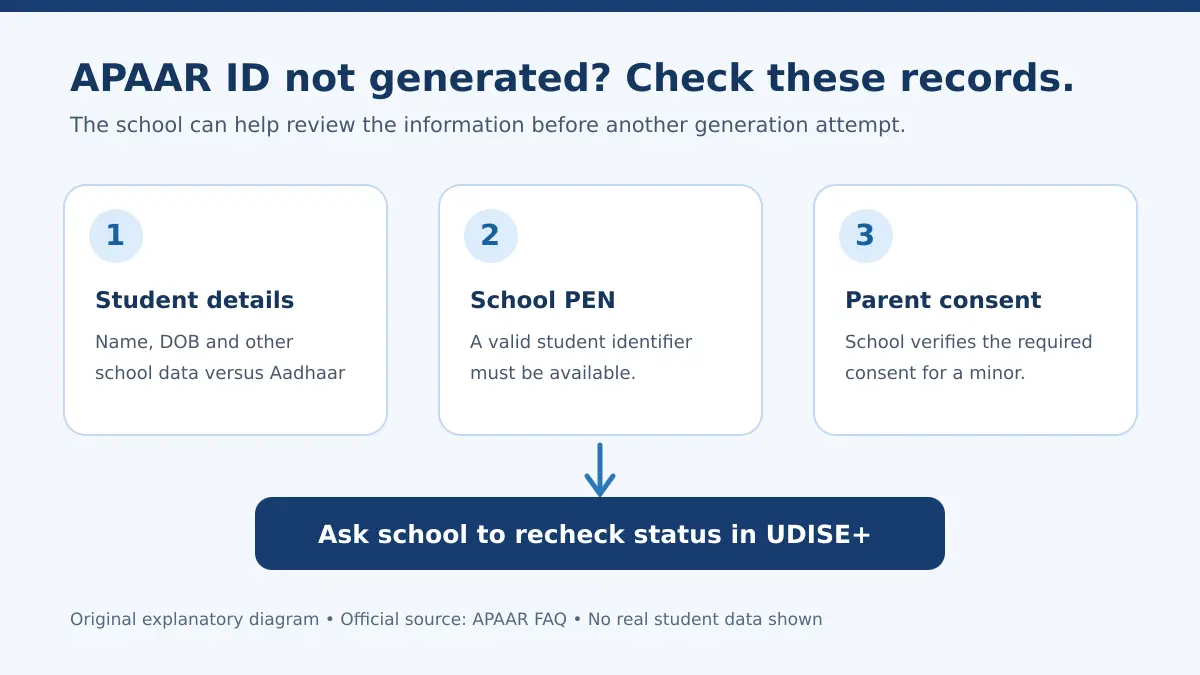
- Student details: Do the name and other relevant demographic fields in the school’s UDISE+ record match the Aadhaar details used for verification?
- PEN: Is a valid Permanent Education Number associated with this student’s record?
- Consent: Has the required parent or guardian consent for this minor been obtained and recorded appropriately?
These are diagnostic questions, not an invitation to overwrite records until the system accepts them. Any correction should reflect the child’s true legal and school information and be handled through authorized channels.
What to do when the school says “APAAR ID is pending”
Step 1: Ask for the current status, not just a promise
Request that the school’s designated operator checks the student’s APAAR status in its official UDISE+ module. Ask whether generation has not started, is under process, or has failed because of a specific mismatch. The exact status labels may vary with the system; what matters is an actionable explanation.
Step 2: Confirm the record that needs correction
Compare the true supporting documents with the school’s entry privately. If the school record contains a typo, ask how the authorized operator can correct it. If the Aadhaar record is genuinely inaccurate, use official UIDAI channels. Do not repeatedly create new identities or use someone else’s credentials to work around a mismatch.
Step 3: Verify PEN and consent
Ask whether the student has the required PEN and whether the consent step is complete for a minor. A family may have completed one requirement while another is still outstanding. Check each independently.
Step 4: Have the school recheck the outcome
After corrections are reflected in the appropriate system, the school’s authorized staff should follow the current official generation or retry procedure. Ask for a realistic follow-up point, such as the date the school will check the status again. There is no reliable universal turnaround time stated for every mismatch; avoid anyone promising that a fee will make the number appear within minutes.
Step 5: Escalate through official help if necessary
If the school cannot resolve the issue, use the official APAAR contact page for the current support options. Share details only through authorized channels and follow the privacy instructions on the site. It helps to keep a written record of when the school first attempted generation, what correction was requested and when it was made, without distributing the child’s documents unnecessarily.
Where should the APAAR ID appear after it is generated?
According to the official APAAR FAQ, successfully generated APAAR IDs can be available in the student’s DigiLocker Issued Documents section. Check the correct account and identity information. If the ID is missing there, first ask the school to confirm whether it has actually been generated. A missing DigiLocker document can be a discovery or linkage problem, but it may also mean the generation step is incomplete.
Do not confuse “not visible in DigiLocker” with a definitive technical diagnosis. If your issue concerns a school board marksheet rather than the APAAR identifier, the checks are different; our guide to marksheets missing from DigiLocker Issued Documents addresses that separate situation.
What parents should know about consent and privacy
It is reasonable to ask why an identifier is being created and which information is involved. The official FAQ describes the consent process, while the APAAR privacy policy gives the programme’s published data-handling information. Read those directly if you have concerns.
Do not post Aadhaar numbers, student photographs, birth certificates, school login credentials or consent forms in social-media comments while seeking help. A legitimate school-side correction does not require a public upload of a child’s identity documents. If a third-party site offers paid “APAAR activation”, verify its authority before sharing any data or money.
Parents sometimes worry that a delay will automatically invalidate a child’s admission or exam application. Requirements can differ across institutions and admission processes. Ask the concerned school or examining authority for the applicable written rule; do not treat an unverified social-media claim as a blanket national rule.
Common mistakes that make the delay harder to solve
- Changing the wrong record: correct the source of a verified mismatch, rather than altering a valid document to match a typo.
- Confusing identifiers: PEN, school roll number, APAAR and ABC references serve different administrative purposes.
- Repeatedly trying unofficial websites: generation is routed through the authorized educational workflow; unofficial portals are a privacy and fraud risk.
- Relying only on DigiLocker visibility: get generation status confirmed through the school first.
- Assuming an instant deadline: keep following up, but ask the school what its actual administrative next step is.
APAAR ID troubleshooting: frequent questions
My child’s Aadhaar is correct. Why is the APAAR ID still failing?
The school may have entered a different spelling or demographic detail, the required PEN may be absent, or another step may be incomplete. Ask the school to inspect the actual UDISE+ APAAR status and check each prerequisite.
Can parents independently force-generate a school student’s APAAR ID?
The official school-student workflow depends on records and authorized school actions. Parents can supply accurate details and consent where applicable, but should ask the school to check and complete its required steps rather than trusting an unofficial shortcut.
Is the APAAR ID the same as a DigiLocker account?
No. DigiLocker is a digital document service; APAAR is an academic identifier. The generated ID may appear under Issued Documents in DigiLocker, but that does not make the two accounts or functions identical.
What if the school cannot tell me the reason for failure?
Ask the designated school operator to review the official status and contact the responsible administration or the official APAAR support channel. Keep the question focused on the specific record or process step that remains unresolved.
Should I pay someone to fix an APAAR ID?
Do not pay an unsolicited agent promising an instant ID or share the student’s documents with them. Use the school’s authorized process and official government support resources.