
A message arrives saying your vehicle has an unpaid traffic fine. It gives you a short deadline, a link and sometimes even a file to install. The natural reaction is to check quickly. That moment of urgency is exactly what a fake e-Challan message tries to exploit.
The safe first step: do not open the link or install an app sent through the message. Open a browser yourself and enter the official government e-Challan address, echallan.parivahan.gov.in, to check whether a genuine challan exists. A message that names your vehicle or looks official is not proof of authenticity.
How a fake e-Challan message tries to fool you
An authentic traffic fine and a fraudulent fine notification may begin with the same idea: a vehicle number and an amount due. The difference is what happens next. A criminal may direct you to a lookalike payment page, ask for card or banking credentials, or persuade you to download an Android application package (APK) disguised as an RTO or e-Challan app.
India’s Computer Emergency Response Team, CERT-In, published an advisory in March 2026 describing malicious Android APKs impersonating transport-related services. The advisory warns that such applications may steal sensitive information and abuse device permissions, including access associated with SMS and banking activity. That is a different problem from receiving an ordinary spam text: the risk increases sharply if a malicious app is installed and granted permissions.
Scam messages can arrive by SMS or messaging apps. Some use urgent language such as a final notice, impending penalty or vehicle restriction. The wording and design change; the underlying tactic does not. The sender wants you to act before you verify.
Five warning signs you should not ignore
1. The message demands an APK download
A file named as a government challan or transport application is not automatically legitimate. A link that instructs you to install an APK outside your normal trusted app process is a serious warning. Do not enable installation from unknown sources to resolve a fine.
2. The link uses a lookalike address
Words such as “gov”, “RTO”, “Parivahan” or “e-challan” can appear inside a deceptive domain. The meaningful part is the actual web address, not the title shown on the button. Avoid relying on search advertisements or forwarded links when checking a fine.
3. You are threatened with an immediate consequence
Deadlines are designed to prevent a careful check. Even if you believe a fine is possible, take a minute to visit the official portal on your own. A genuine obligation does not require you to trust a random sender.
4. It asks for banking secrets or a one-time password
Do not enter your card PIN, banking password or OTP into a page reached from an unsolicited traffic-fine message. Do not read an OTP aloud to someone claiming to be a transport official or support agent.
5. The payment instructions feel unrelated to a government portal
Be especially cautious if you are asked to pay an individual account, send a screenshot to a stranger, or continue the payment in a personal chat. If you still cannot tell whether the message is legitimate, stop and use the official channel.
How to check whether you actually have a traffic challan
- Open a fresh browser window. Do not use the message’s link.
- Type https://echallan.parivahan.gov.in/ yourself. Follow the portal’s current official verification steps.
- Use the vehicle or challan details requested by the government system. Check the displayed information carefully before paying.
- If no matching record appears, do not pay the message sender. If details are unclear, contact the relevant official traffic authority through independently obtained details.
- Keep the genuine challan reference and payment receipt if you pay through the official channel.
Government sites and procedures can change. The Ministry of Road Transport and Highways also operates transport services through official government domains; the key habit is to navigate independently and confirm that the address belongs to the government, not a near-match.
If you are buying a used vehicle, verifying outstanding challans is part of a wider document check. Our used-car delivery checklist explains the other checks that help prevent surprises after handover.
What to do next depends on what you actually did
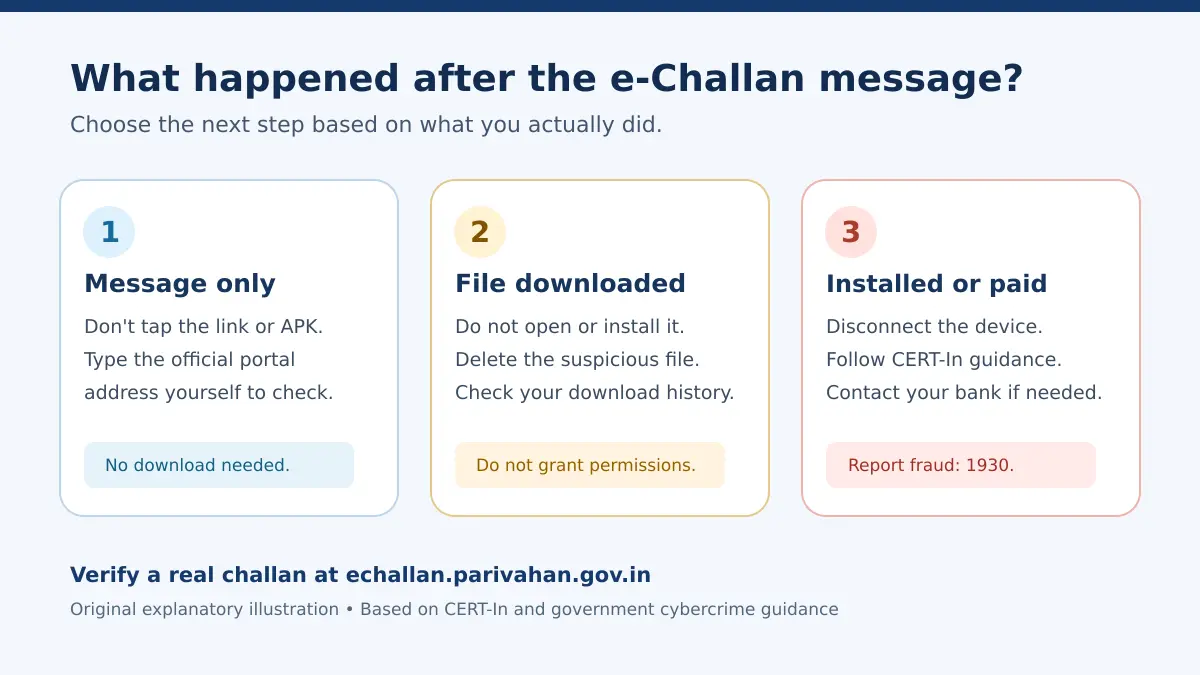
There is no benefit in panicking over a text you merely received. The right response depends on whether you clicked, downloaded, installed, shared information or sent money.
You only received the message
Do not click anything in it. Verify through the government portal if you think a challan is possible. You can report or block the suspicious sender using the facilities available on your phone. There is no need to install any software simply because a message arrived.
You clicked a link but did not enter details or install anything
Close the page. Do not accept permission prompts, browser notifications or downloads. Check the device’s recent downloads and browser permissions if the site behaved unexpectedly. The risk is not identical in every case, but continuing to interact with the page adds avoidable exposure.
You downloaded an APK but did not install it
Do not open or install it. Delete the file and inspect recent downloads. A downloaded file is not the same as a successfully installed application; nevertheless, avoid forwarding it to friends for “checking”, because that can spread the attack.
You installed an app, granted permissions or entered sensitive details
Treat this as urgent. CERT-In advises disconnecting an affected device from networks, removing suspicious applications, using trusted security tools and securing compromised credentials. If banking details or OTPs were exposed, contact your bank immediately through a trusted number and discuss blocking or protecting affected accounts. If you cannot confidently restore the device’s security, obtain qualified technical assistance before using it for sensitive transactions again.
Also consider whether the fraudulent app could read SMS messages or notifications and whether passwords were reused on other accounts. Change credentials from a trusted device where practical. Do not assume uninstalling a suspicious app automatically reverses every exposure.
If you paid a scammer or suspect financial fraud
Act promptly and preserve evidence. Contact your bank or payment provider using its official app, card or website contact details. In India, report financial cybercrime through the national helpline 1930 and the official portal cybercrime.gov.in. Give a clear timeline, the amount, transaction reference, receiving account or UPI ID if visible, and screenshots of the message without sharing your passwords or OTPs.
Reporting quickly can improve the possibility of intervention, but recovering money is not guaranteed. Do not believe a stranger who offers a paid “recovery service” and asks for another transfer. If an account or phone number was taken over as well, our WhatsApp account recovery guide covers the account-specific first steps.
A simple two-minute family safety habit
Many people who receive these messages are not careless. They are simply busy, worried about a penalty, or unfamiliar with official portals. Share one practical rule with parents, new drivers and family WhatsApp groups: no traffic-fine payment starts from a forwarded message link. Open the real government portal independently. Never install an APK on someone’s instruction. Never disclose an OTP to “close” a challan.
You can rehearse the safe workflow once using a bookmarked official portal. Familiarity matters: when the next alarming message arrives, nobody has to make a rushed decision from scratch.
Common questions about fake e-Challan messages
Can a fake message contain my real vehicle registration number?
Yes, apparently accurate details do not prove that the sender is authentic. Verify on the official portal without using the message’s link.
Is an e-Challan APK compulsory to pay a traffic fine?
No. Do not install an APK sent in an unsolicited message. Use a verified official government service.
What if I cannot find the fine on the official portal?
Do not pay the message sender. Recheck the entered details, allow for legitimate record updates where applicable, and contact the responsible traffic authority independently if still uncertain.
Should I call 1930 if I only received a suspicious SMS?
The national 1930 helpline is particularly relevant when financial cybercrime or money loss is involved. You can also use the reporting channels on the national cybercrime portal for applicable complaints. If no money or data was shared, avoid interacting with the sender and retain evidence if needed.