

After uploading a résumé, review the application’s extracted fields before submitting. A successful file upload does not prove that your name, contact details, employment dates or qualifications were read correctly. It also does not prove that you have applied for a particular vacancy.
This is a practical verification task, not a contest to achieve a mysterious “ATS score.” An applicant tracking system can hold an attachment, structured profile information and job-specific answers at the same time. Your aim is to make those records accurate and consistent, while following the employer’s actual instructions. The same habit is useful to applicants in India and the United States, although portals and recruitment rules differ.
In this article — jump to a section
A file, a profile and an application are different records
The iCIMS candidate guide distinguishes building a profile, answering subsequent questions and receiving an application confirmation. It also explains that submitting a résumé for general consideration may place it in a company’s system without applying to a specific position. Employer configurations vary.
Think of three checkpoints. First, did the correct file attach? Second, do the visible profile and application fields describe you accurately? Third, did the final submission succeed for the intended job? Passing one checkpoint is useful evidence about that stage only.
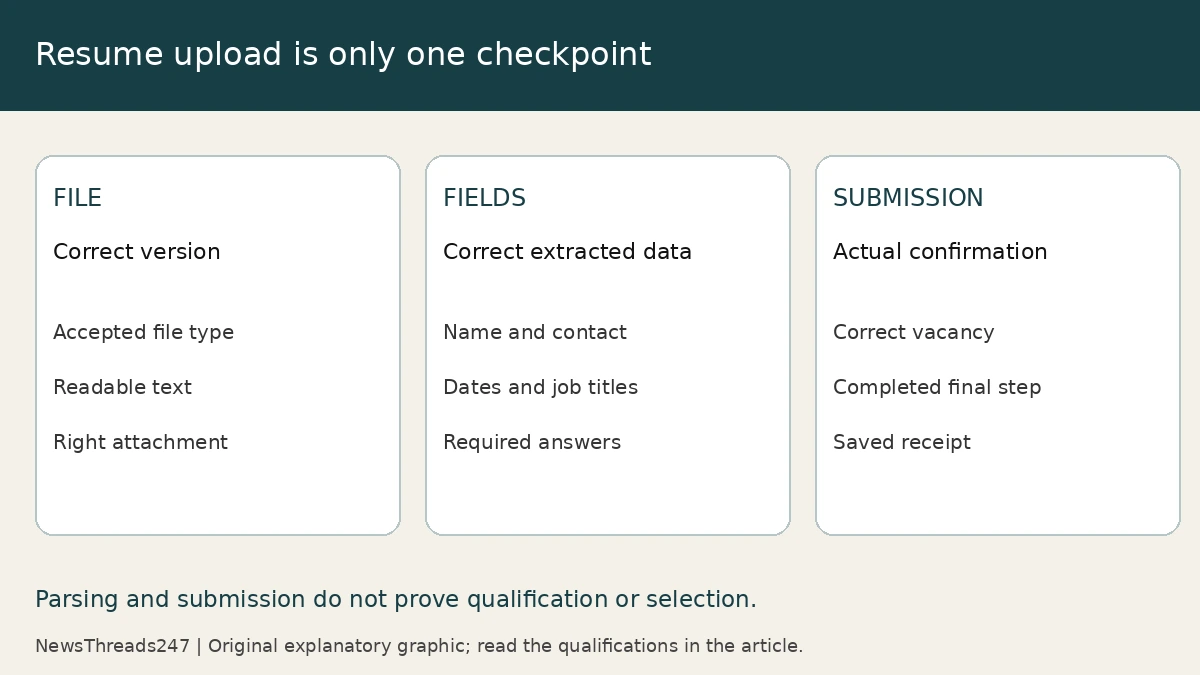
This distinction makes troubleshooting easier. If the file attached but a field is wrong, correct the field. If the profile is complete but the vacancy remains unfinished, resume the application. If the application shows a confirmation but no hiring update, that is a status question for the employer, not proof that the parser rejected you.
Prepare a readable, truthful source file
Use the file type and size requested on the actual application. Do not apply a rule from one vendor to every employer. MyGreenhouse’s candidate FAQ, for example, recommends PDF and tells applicants to review and edit parsed information. That is product guidance, not a universal requirement to avoid every other file format.
For readability, use clear section headings, normal text and a coherent employment chronology. Greenhouse’s parsing troubleshooting guidance identifies potential problems such as image-only résumés, complex layouts, headers, footers and text boxes. Its recruiting parser has a stated 2.5 MB parsing limit; that should not be confused with every upload limit on every portal.
A sensible precaution is to keep essential information in ordinary document text. Check whether you can select and copy the text in your exported file, and read the result for missing or scrambled content. This is a basic readability check, not a simulation of a recruiter’s software or a prediction of hiring success.
Keep claims truthful when tailoring the résumé. Expand an abbreviation if that makes an actual responsibility clearer, but do not invent a qualification or copy the entire job description into hidden text. A readable file should help someone understand your evidence. It should not conceal misleading keywords.
Review the fields that change the meaning
Begin with identity and contact details. A one-character email error can matter more than an attractive layout. Check the phone’s country code, the location actually entered and any portfolio link. Open the link you intend to provide and make sure it shows work you are allowed to share.
Next compare employer names, job titles, start and end dates, education and qualifications against your source records. Look for a current role incorrectly assigned an end date, a promotion presented as a change of employer, or a qualification that has been placed in the wrong field. Read the meaning, not only the spelling.
| Field | A useful check | What to avoid |
|---|---|---|
| Employment dates | Each role’s month and year match the résumé and your records. | Accepting an inferred date without reviewing it. |
| Job title | The title identifies the actual role and level. | Changing it to a more senior title to match the vacancy. |
| Qualification | Course, institution and completion status are accurate. | Presenting an unfinished programme as awarded. |
| Screening answer | The answer addresses that exact question. | Assuming the uploaded résumé answered it automatically. |
Vendor behaviour can make this review consequential. Leapsome’s documented autofill can replace values already typed into matching fields, and can convert an approximate period into a specific date. Its guidance advises uploading first and reviewing before submission. Other systems can behave differently; watch what this form actually does.
A fictional example: one employer, two roles
Consider a fictional applicant who worked at one company from July 2021 to March 2025, becoming a team lead in April 2023. The résumé separates the two roles. After upload, the form shows “Team Lead, July 2021–March 2025.” The company dates look plausible, but the role duration overstates the applicant’s leadership experience.
The repair is to represent the progression accurately using the fields the portal offers. If it accepts separate role entries, use them. If it permits only one company entry, provide a concise accurate explanation where appropriate. Do not adjust dates just to remove an inconvenient gap or make the autofill look tidy.
The same principle applies to concurrent study or part-time work. An apparent overlap may be real and explainable. A parser cannot be assumed to understand the arrangement, but the answer is a clearer record rather than a fabricated sequential history.
Finish the correct application and keep its receipt
Before pressing the final button, recheck the vacancy title, job ID and location. Review required answers separately from the profile. A saved profile can help with later applications, but it does not replace job-specific questions or an employer’s eligibility requirements.
When the portal confirms submission, retain the confirmation, date and vacancy reference in a private application log. Save a copy of the résumé version you used. This matters when you later revise your standard file and need to remember exactly what an employer received.
Do not assume replacing a résumé in a profile rewrites every earlier application. MyGreenhouse, for instance, describes using the most recently uploaded résumé by default and limits what it can show about earlier submissions. Follow the particular employer’s correction process rather than repeatedly uploading files and assuming all records changed.
Profile verification also sits alongside employer verification. Our Indian job-offer verification guide addresses that separate safety question. Accurate application data does not make an unverified vacancy legitimate.
What to do when autofill fails
If autofill fails, check the displayed error and the employer’s file instructions. Try a compliant, readable export if appropriate. Where the form permits it, enter accurate details manually. An attached file plus corrected fields may be a valid route; a parsing warning is not automatically a rejection.
If the form itself prevents a required correction, contact the employer’s recruitment support through the genuine careers site. Describe the job reference, field and error without sending passwords, unrelated identity documents or confidential material in a public comment. Ask how to correct the application before creating duplicate accounts or submissions.
After submission, report a material error promptly through the supported channel and keep the correspondence. A precise note—what was wrong, what is correct and which application it concerns—is more useful than a general request to “fix my ATS.” No applicant can guarantee how an employer will assess a correction, but a clear record gives it something reliable to review.
Editorial method and maintenance: This guide compares first-party iCIMS, Greenhouse and Leapsome instructions checked on 6 November 2026. It includes original checklists and a fictional employment-history example; no employer system was tested and no résumé was scored. Recheck after a portal redesign, parser change or revised vacancy instructions. AI illustrations show fictional people and generic interfaces. They are not recommended templates. The diagram is original explanatory work.