

To calculate a weighted college grade, turn each category’s mark into the points it contributes to the entire course. Multiply its mark by its weight as a decimal, then add the results. If assignments are worth 40% and your assignment mark is 90%, that category contributes 36 points toward the course’s 100. A gradebook may instead show how you are doing on work graded so far. That figure answers a useful question, but it will not necessarily match your eventual course grade.
In this article
Find the grading rule before opening the calculator
Open the latest syllabus, including any written changes from the instructor. Copy the category weights and record which scores belong in each category. In a straight points course, the total is earned points divided by possible points. In a weighted course, the category’s percentage is first calculated and then multiplied by its separate weight. A weighted syllabus might call homework 40%, the midterm 25% and the final 35%, even when the raw points in the gradebook add to a different total.
Look for exceptions before estimating anything: a dropped score, a lab that must be passed separately, a minimum final exam mark, a penalty cap, a curve, extra credit or a particular rounding rule. The calculations below assume fixed weights that add to 100% with no such exceptions. Florida State University’s Canvas guidance explains how weighted and unweighted gradebook setups differ. If the syllabus and the gradebook look inconsistent, ask the instructor which setup will govern the final reported grade.
Calculate the category mark using its own rule
When a category uses ordinary points, divide total earned by total possible inside that group. Imagine two assignments worth 20 and 80 points. You earn 18 and 60, respectively. Your mark is 78 out of 100, or 78%. Averaging the two percentages, 90% and 75%, would give 82.5%; that calculation gives each assignment equal influence, although the second is worth four times as many points. If the instructor explicitly weights the two assignments equally, then the second method could apply. The point is to identify the rule before choosing the denominator.
Instructure’s assignment-group documentation explains the calculation for Canvas groups that use the point totals. It also explains how a category without graded items affects the displayed total. Keep a separate note for blank, excused and zero scores. A blank may represent an ungraded submission rather than a penalty; a recorded zero can be part of the denominator. Ask about anything ambiguous rather than replacing blanks with zeros on your own.
Separate graded-work average from course points earned
Use the example in the lead graphic. A 90% assignment category contributes 36 points and an 80% midterm contributes 20, for a total of 56 course points. Those categories together represent 65% of the course. If they are complete and the final is the only remaining category, the average on graded work alone is 56 ÷ 65, or 86.15%. The final course percentage will be 56 plus whatever the final contributes. Reporting 86.15% without saying it covers only the graded portion is where many apparent discrepancies begin.
Instructure’s student guide to What-If Grades distinguishes calculations based only on graded work from totals that include ungraded items. Montana State University’s grading guide also explains the relationship between Canvas’s totals and grading setup. The details are platform- and course-specific; your course rules take precedence. If there are more assignments still to be graded, the 56 points in this example would not yet be fixed. Forecast scenarios for the remaining assignments too.
Work backward from the overall mark you want
For an 80% course target in the example, you need 24 more course points. Each final-exam percentage point supplies 0.35 course points. Divide 24 by 0.35 to get about 68.57% on the final before rounding. Check what the exam can actually award: if only whole percentage points are possible, 69% would clear that mathematical threshold in this example. If the exam reports points out of 80, test the actual achievable point totals instead of treating 68.57% as a possible score.
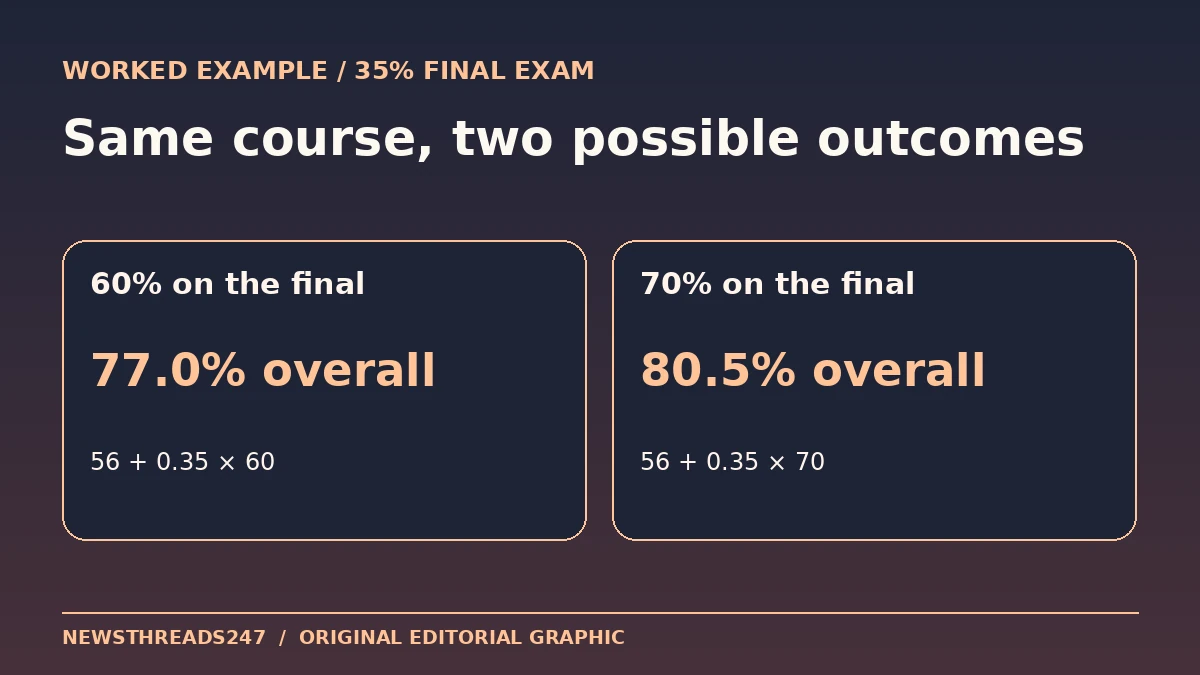
The check works forward, too. With 60% on the final, you add 21 points and end at 77%; with 70%, you add 24.5 and end at 80.5%. If your calculation requires more than 100%, the target is outside this example’s fixed rules. That is a cue to verify the assumptions, not a reason to count unannounced extra credit. If more than one category remains open, choose a plausible mark for one and calculate the requirement for the other; run a second scenario with a lower assumption to see how sensitive the target is.
Turn the estimate into a short action plan
Make a sheet with category, syllabus weight, earned and possible points, category percent and course points. Mark rows as closed or still moving. Reconcile a single category against the gradebook first; that makes a points-versus-average mistake easier to find. Write down any missing work, drops and grade thresholds next to the calculation so you can see what would invalidate it. Recalculate after a corrected score, syllabus change or newly posted grade.
If a result matters for progression or a scholarship, confirm the applicable minimum and rounding with the responsible instructor or office. Then use the estimate for a decision you control: which assignment to clarify, what score is mathematically attainable or how to allocate your revision time. The guide to retrieval practice and spaced study can help with that last step.